How to translate the Free Audio Editor user interface
to your own language
A FREE way to get our products that
need registration to Deluxe version - you could help us
translate the interface and/or the help files of our products
into your native language and as a reward for your assistance,
you would get the Deluxe License for our software products,
which is completely free of charge. Please
send your questions and propositions concerning the translation
to
translate@free-audio-editor.com
- any suggestion would be appreciated.
This page is intended to be a general guideline for translators
and keep this in mind - you don't have to be a programmer
to translate our products to your native language.
Please follow these steps to begin your translation:
1. Download the latest version of
SIL Editor from here (SilEditor_Setup.exe)
and launch it.

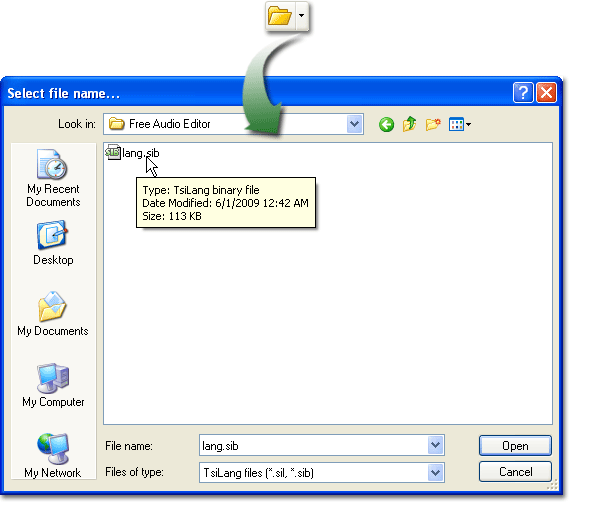
2. Click "Open"
or press Ctrl+O to open the browser
window. Choose the file "lang.sib" (Click
here to download it) and click "open".
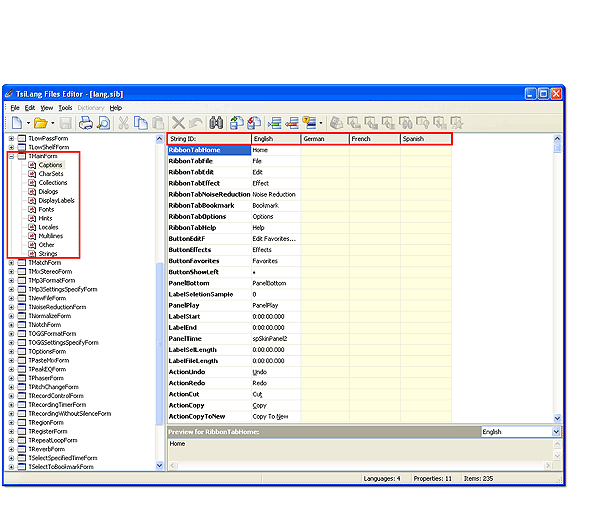
3. Now you can select the items listed
on the left to translate (Let's take the item "TMainForm
- Captions" for example here).
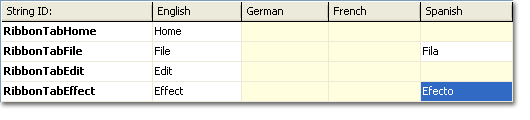
Click "Captions" and you can see five columns:
"String ID", "English", "German", "French" and "Spanish".
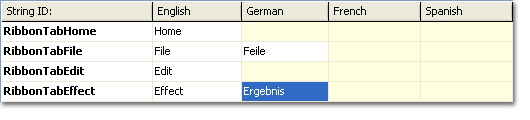
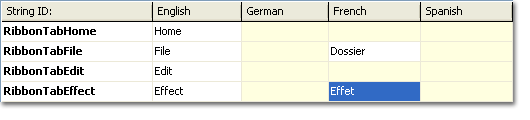
4. Translate.
(Let's take the words "File" and "Effect"
for example here)
5. Click "Save current files"
or press Ctrl+S to save your translation.

6. When you translate all the listed
items, please check for spelling
mistakes and proper capitalization.
7. When you finish checking, please
send us (translate@free-audio-editor.com)
the file "lang.sib".
8. We will send you a setup
file as soon as possible. Please launch the file to
install the program.
9. Congratulations!
Now you can see your translation on the interface of our
product - just one step to go
- please re-check your translation and
see if the translated texts fit the buttons
and shorten them if needed.
10. Send your reconfirmed
"lang.sib" file to us (translate@free-audio-editor.com)
and we'll send the License for the software
product to you immediately when we ultimately confirm the
translation.
Translating suggestions
In the translation process there are two languages involved:
the source language and the target language. When translating
Free Audio Editor, English is the source language. For a
successful translation it is required that you are "perfect"
in the target language - which is supposedly your mother
tongue.
It is useful to take a look at the most commonly used
software packages translated into your language in order
to use the same expressions for similar commands and buttons.
In this way everybody will understand your translation.
When translating phrases or sentences it is a good idea
to go by the meaning (instead of translating word by word).
Once you have understood the precise meaning of the phrase
or sentence in English, forget the words and use a phrase
in your own language . Construct a sentence that conveys
the meaning (the idea) of the original and sounds natural
in your language.
Another issue coming up often during translations is
the use of the formal or informal language. In many languages
there are different forms, for example the German "du" vs.
"Sie", or French "tu" vs. "vous". Check which one is mainly
used in other translations - or what is culturally accepted
in your language. As Free Audio Editor is a commercial software
program, please use the formal language wherever possible.
Some English texts in the PO file does not seem to make
sense, for example "1.20", "xxx", "-", or ">>". Just keep
these characters as they are and do not translate them.
Many texts contain an ampersand character ("&"). The
ampersand specifies the accelerator key. For example, the
text for the File menu is "&File" so that you can press
Alt + F in the Free Audio Editor main window to access the
File menu. As it is very time consuming to test which accelerator
keys have already been specified for the same window, you
can choose to not use accelerator keys at all.
IMPORTANT LIMITATIONS!
For technical reasons, Free Audio Editor can only
be translated to languages with a Roman character set.
That means that languages such as Russian, Chinese,
Hebrew, Japanese, Arabic, etc. don't work at
this time.